
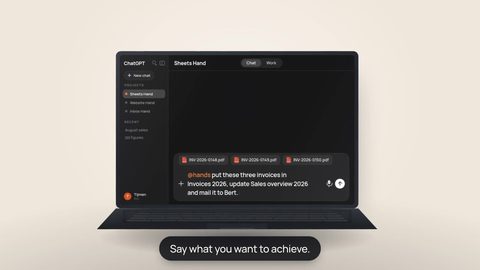
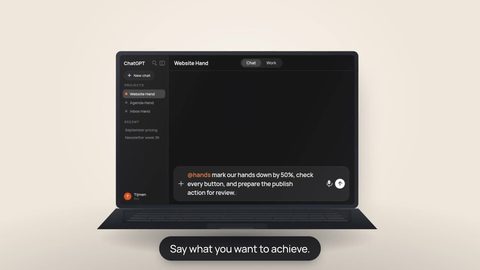
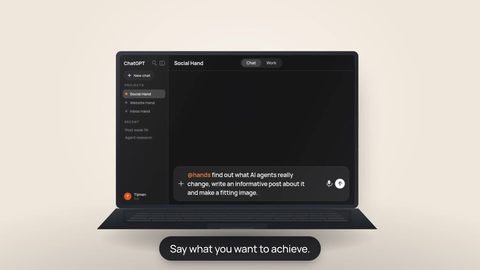


AI discussions often focus on the model: which model reasons best, writes best, or can hold the most context? That makes sense, but once AI needs to perform work on its own, the model is only one part of the system.
The model is the brain. The harness around it gives that brain tools, context, a place to work, rules about what it may do, and feedback about what actually happened.
What do we mean by an AI harness?
In practice, you can think of an agent harness as the technical layer around an AI model that turns a conversation into an executable work process. It decides which tools are available, which files the AI can use, which apps are connected, which instructions or skills apply, when your approval is required, and how results return to the conversation.
That creates an important distinction. A plain language model can explain how something could be done. An agent with a good harness can gather the required information, adapt its plan to what it discovers, perform the work, and then check what actually changed.
Why the harness matters so much
Agentic work is a loop. The AI looks at the situation, chooses an action, uses a tool, sees the result, and then decides what should happen next. If those tools are unclear, context keeps disappearing, or the agent cannot check what really happened, errors can compound quickly.
That is why a strong harness is not simply about giving AI more capabilities. It is about giving it clear capabilities: well-described actions, bounded access, real environmental results, and moments where a person can inspect or intervene.
This is also why modern agent architectures put so much emphasis on tools, memory or state, guardrails, observability, and human approval. The model remains probabilistic. The harness tries to make the environment around it as predictable and controllable as possible.
What Hands adds as its own harness
Hands is not an AI model. You keep using the AI you already know, such as ChatGPT, Claude or Perplexity. Hands supplies the execution layer beneath it: every Hand has its own workspace, files, app connections and access rules.
Behind the scenes, that goes further than a list of integrations. Hands can discover available capabilities, expose the right tool contract to the model, load skills for specific ways of working, run longer tasks as durable jobs, and return results to the same AI conversation. Actions with real consequences can pass through a review or approval step before execution.
- Tools become real actions. Reading, searching, editing files, running commands and working with connected services are concrete capabilities rather than text suggestions.
- The workspace preserves context. Project files and progress do not need to be rebuilt from scratch every time a new chat starts.
- Skills carry working methods. Repeated or specialist tasks can load extra procedures without requiring you to spell out every technical step yourself.
- Boundaries are part of execution. Access and approval live in the work process rather than only in a warning inside a prompt.
- Results return as evidence. The AI can base the next step on files, tool output, tests or other measured outcomes instead of assumptions alone.
Why a separate workspace matters
Every Hand gets its own isolated cloud workspace. Think of it as the practical sandbox for that digital coworker: a separate Linux environment where its files, projects and runtime live. The Hand does not work directly on your laptop and does not automatically share its workspace with another Hand.
That separation matters for two reasons. First, the work stays together: a project can persist while you switch devices or use a different AI interface. Second, it creates a clear boundary between the Hand’s environment and your own computer or other Hands.
Inside its own workspace, a Hand can still perform real computer work. The point of the separation is not to make every action tiny; it is to give powerful execution its own recognizable place, separate from your laptop and other Hands.
One harness for new and experienced AI users
For an experienced developer, the idea of an agent harness is not new. You can build your own server, wire MCP tools, configure OAuth, manage secrets, expose a shell, write skills, add logging and decide which tool calls require approval.
The problem is that you have to build a small agent platform before the agent becomes useful. Hands tries to provide that layer as a product for a much larger group of people.
A beginner therefore does not need to know what a capability graph, shell or OAuth token is. They can simply say:
“Review the documents in this Drive folder, make a list of the open actions and prepare a draft schedule. Do not change anything in my calendar until I have seen it.”
An experienced user can still go much deeper: inspect a repository, run tests, update several files, execute a build, or apply a specialist skill. The interface can be simple without making the underlying capabilities toy-like.
More capability needs more control
An agent that only writes text can mostly give you a bad answer. An agent that can change files, websites, repositories or business apps can create real consequences. The harness therefore becomes more important as the agent becomes more capable.
Hands treats that control as part of the infrastructure. You can set boundaries for connected apps. Some actions can run automatically, others can be blocked, and more sensitive actions can require your explicit review first. The proposal you see is bound to the action that is actually executed afterwards.
Verification matters too. A tool call being sent successfully is not proof that a task is finished. A good agent process reads back, tests where possible, and uses the measured outcome to decide whether the work is truly complete.
From a normal request to real work
The easiest way to feel the difference is a task that needs several steps. Without a harness, you have to gather the context, move files around and translate every technical step yourself. With a harness, the AI can handle much of that intermediate layer.
 Plan & capabilitiesThe AI determines which information and tools it needs.
That is ultimately what Hands is trying to make accessible: not only chatting with a smart model, but giving that model a stable, bounded and useful way to do work.
You can use the same Hand with several supported AI providers. The chat interface and model can differ while your Hand’s identity, workspace, files, chosen apps and access rules remain with the Hand.
Give the AI you already use more than answers. Give it a place to work.
Start with one Hand, connect only the apps you need and decide how much freedom each kind of action should have.